
OrigAI

Home Products OrigPDF

PDF workstation · free

Your PDFs stay with you.

Read, annotate, sign, reorganise and convert your documents on your own computer. Nothing is uploaded, nothing is tracked, no account to create.
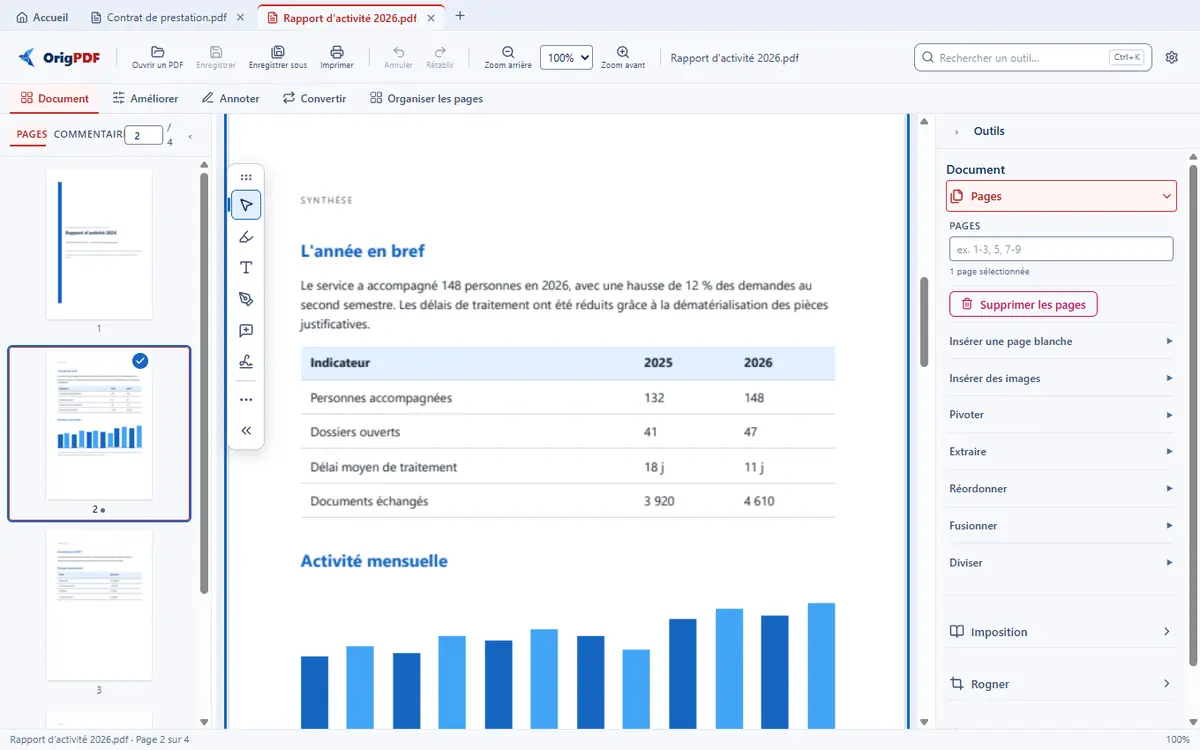
OrigPDF with a report open: document tabs at the top, page thumbnails on the left, a page with a table and a chart in the centre, page tools panel on the right. Fictitious document.
Tabs, page thumbnails, tools at hand. Fictitious document.

Features

All your PDF work, in one place

Read and annotate

Highlight, write, draw and comment, with your annotations saved in the file.

Sign

Add an image signature, or sign with your digital certificate.

Organise pages

Reorder, rotate, delete, extract, merge several PDFs or split one, keyboard included.

Convert

Turn Word, Excel, PowerPoint files or images into PDF, or start a blank PDF.

Protect

Lock a document with a password before sharing it.

Print and crop

Imposition for booklets, cropping, and a clean print dialog.

Local-first

Your documents never leave your computer

Contracts, medical records, payslips: the documents you handle every day are often sensitive. OrigPDF processes them where they already are.
  • No cloud upload, ever
  • No telemetry, no account
  • Automatic updates, verified by signature
  • Windows and macOS, Apple silicon or Intel
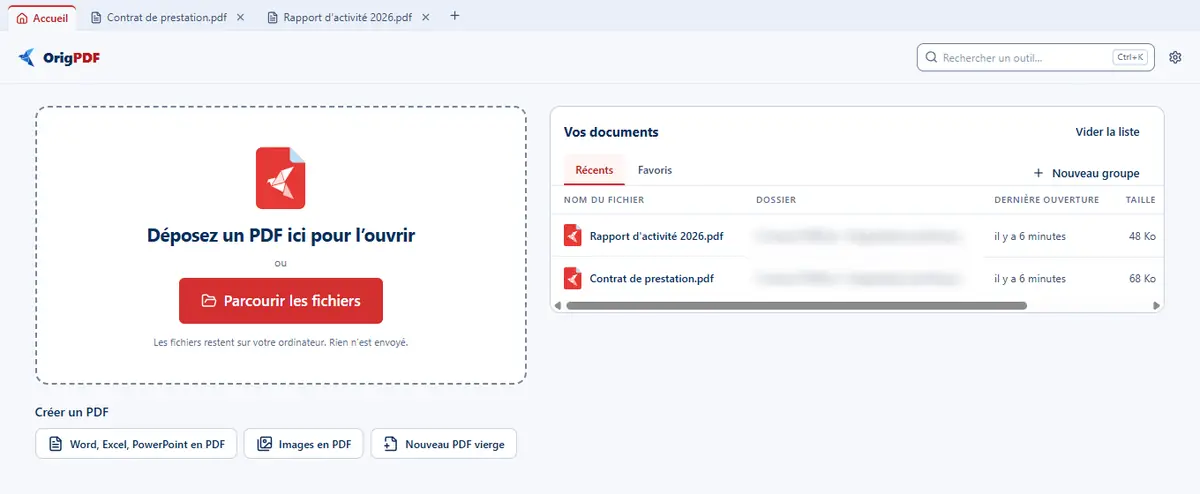
OrigPDF home screen: drop zone reading “Files stay on your computer. Nothing is sent.” (shown in French), list of recent documents and PDF creation buttons.
Home: drop a PDF, find your recent files. Fictitious documents.
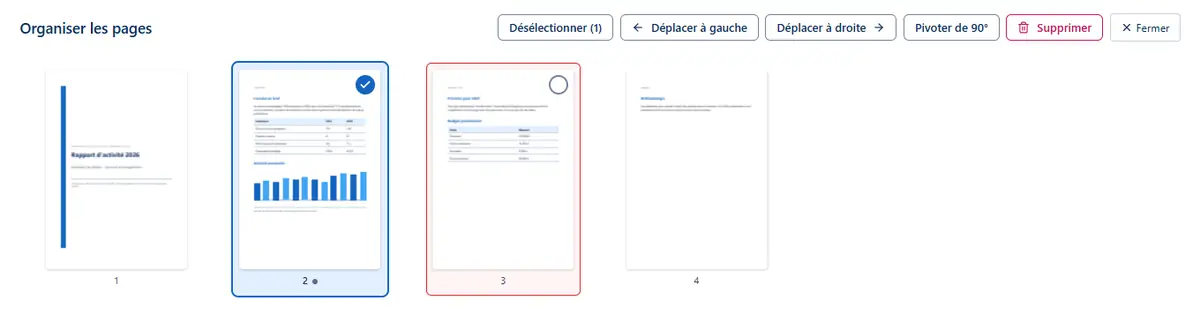
OrigPDF Organise pages view: the four pages of the document as thumbnails, one page selected, buttons to move left or right, rotate 90 degrees, delete.
Organise pages: select, move, rotate, delete. Fictitious document.

Pricing

Free, really

For everyone

Free

No account, no advertising, no hidden limit

  • Every feature included
  • Automatic updates
  • Windows and macOS
Download OrigPDF

For organisations

Quote

When you need more than the download

  • Deployment across your whole fleet
  • Features built for your workflows
  • Support and follow-up
Contact me

Download

Install OrigPDF

Release notes 1.0.2 (Windows)
  • Full-width Home: "Your documents" uses all the space, with no horizontal scrollbar.
  • The favorite star and the "Add to group" button sit next to each document's name.
  • Groups: "Add files" adds several PDFs at once; "Link a folder" keeps a group in sync with a folder.
  • Ctrl+D adds the open document to favorites, Ctrl+Shift+D to a group.
  • LaTeX projects: editor, compile, completion, templates, SyncTeX and Zotero citations.
  • Tabs form the title bar and can be dragged out into a new window.
  • New Bookmarks, Outline, Properties and Contents panels; display modes in the bottom bar; Ctrl+wheel to zoom.
  • Settings organized in tabs.
Release notes 1.0.1 (Windows)
  • Printing fixed: choose the printer, number of copies and two-sided printing, right in OrigPDF.
  • Real printers are offered first; "Microsoft Print to PDF" and other printers that save a file are marked as such.
  • Pick the pages to print by clicking their thumbnails, enlargeable preview, booklet printing.
  • The printer list appears within seconds, even when a network printer is off.
  • Zoom really changes the size of the pages.
  • Selection mode: a click adds or removes a page from the selection, no Ctrl needed.
  • Organize pages: slider to enlarge the thumbnails.
Release notes 0.1.0

First public release, Windows and macOS (universal).

Installation and verification

Windows

The installer is not yet signed with a publisher certificate: if Windows shows “Windows protected your PC”, click “More info”, then “Run anyway”.

macOS

  1. Open the .dmg file and drag OrigPDF into Applications.
  2. OrigPDF is not yet notarized by Apple. The first time you open it, macOS blocks it: go to System Settings › Privacy & Security and click “Open Anyway”. On macOS 14 and earlier, right-click the app › Open is enough.
  3. If macOS says the app “is damaged”, run this in Terminal: xattr -dr com.apple.quarantine /Applications/OrigPDF.app

SHA-256 checksums

.exe (1.0.2) 501bb2f69986694e04258d723872b37f33bd9df78efa6db490169db8bee818e8

.dmg (0.1.0) 05b25d99d8a8bb79fe79b128fbb9bbd88e47d2b8ab0884f402f36344c535a5ae

Version
1.0.2 (Windows), 0.1.0 (macOS)
Released
18 Nov. 2026 (Windows), 4 Oct. 2026 (macOS)
Windows
Windows 10 / 11, 64-bit
macOS
macOS 11 or later, Apple silicon or Intel
Updates
Automatic, signature-verified